
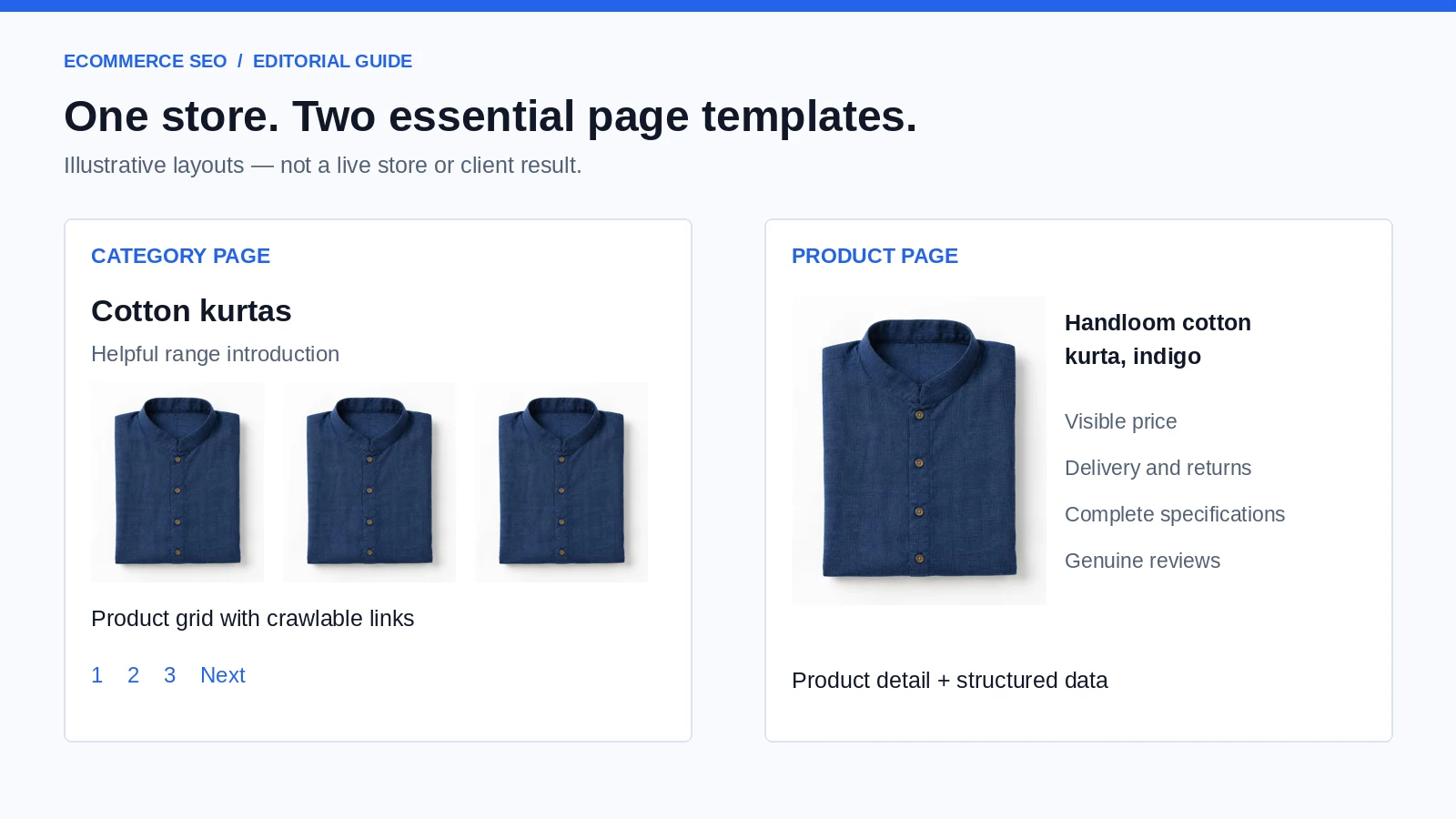
Most of the indexable pages in an online store are built from two templates: category pages and product pages. When those templates are built well, every new product inherits good SEO. When they are built badly, the same mistake repeats across hundreds or thousands of URLs.
This ecommerce SEO checklist focuses on those two templates. It covers how to map keywords to categories, write product pages that answer buying questions, handle variants and filters without creating duplicate URLs, add product structured data, keep the right pages indexed and measure whether any of it is working.
It assumes you already have the basics in place (HTTPS, a mobile-friendly theme, Google Search Console access). If you need a site-wide technical review first, start there and come back to this list.
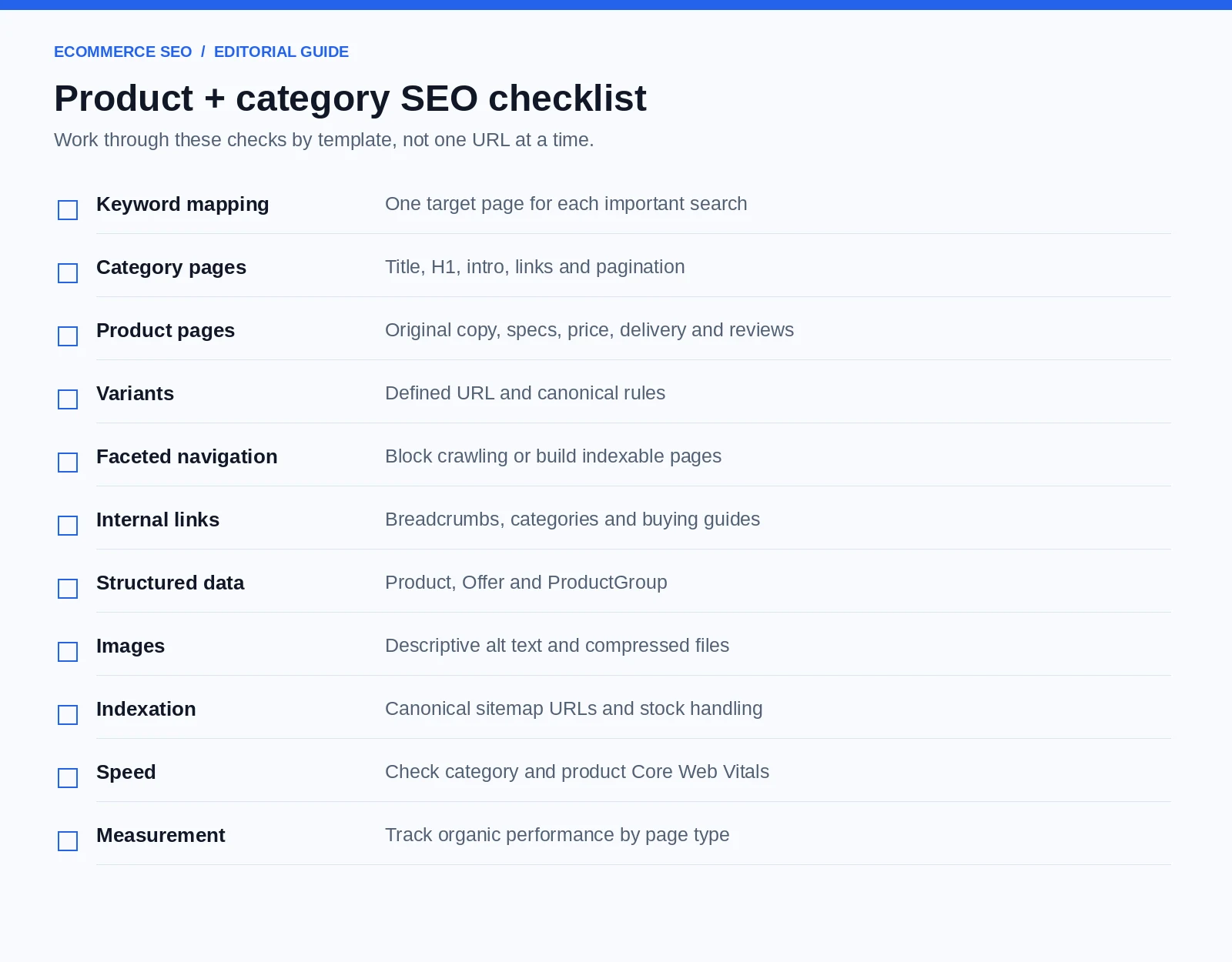
The checklist at a glance
Use this table as a quick audit. Each row is explained in detail further down.
| Area | What to check | Usually fixed in |
|---|---|---|
| Keyword mapping | Each important search has one target page, and no two pages compete for the same query | Category structure, content plan |
| Category pages | Unique title and H1, helpful intro copy, crawlable links to every product, clean pagination | Category template |
| Product pages | Specific titles, original descriptions, full specs, price, delivery and returns, reviews | Product template, product data |
| Variants | Clear rule for one URL or variant URLs, with correct canonicals | Platform settings, template |
| Faceted navigation | Filter URLs either blocked from crawling or deliberately built to be indexed | robots.txt, URL rules, template |
| Internal links | Breadcrumbs, links between related categories, links from guides to categories | Navigation, templates, content |
| Structured data | Product, Offer and ProductGroup markup that matches the visible page | Template code or app |
| Images | Descriptive file names and alt text, sized and compressed files | Media workflow |
| Indexation | Sitemaps list canonical URLs only, correct status codes, sensible out-of-stock handling | Server, platform, sitemap settings |
| Speed | Core Web Vitals checked for category and product templates separately | Theme, scripts, images |
| Measurement | Organic performance tracked by page type, with revenue tied to landing pages | Search Console, GA4 |
Category keyword mapping: give every search one page
Keyword mapping decides which page should rank for which search. On a store, the decision matters more than on a service site, because the platform can create several pages that look relevant to the same query: a category, a subcategory, a tag page, a filtered view and a search results page.
Match search types to page types
Different searches suit different templates. A rough guide:
| Search example | What the shopper wants | Best page type |
|---|---|---|
| "cotton kurtas for women" | Browse a range | Category page |
| "black cotton kurta" | A narrower slice of a range | Subcategory, or an indexable filter page if demand justifies it |
| "[brand] [model] kurta size 40" | One specific item | Product page |
| "how to choose a kurta fabric for summer" | Advice before buying | Blog post or buying guide that links to categories |
Broad, commercial searches usually belong to category pages, because shoppers want choice. Product pages tend to win searches that include a model name, brand or very specific attributes.
Avoid two pages chasing one query
Once the map exists, look for clashes. Common ones include:
- A category and a tag page with nearly the same name ("Running Shoes" and "running-shoes" tag).
- A subcategory and a filter that produce the same set of products.
- Two products that differ only in colour, each optimised for the same broad term.
Pick one page for each query, adjust the others so they target something different, and point internal links at the chosen page. If you track rankings in Search Console, a query that keeps switching between two of your URLs is often a sign of this problem.
Checklist
- Every priority category search has one target URL.
- No tag, filter or search page duplicates a category.
- Broad terms point to categories; specific terms point to products.
Category page SEO checklist
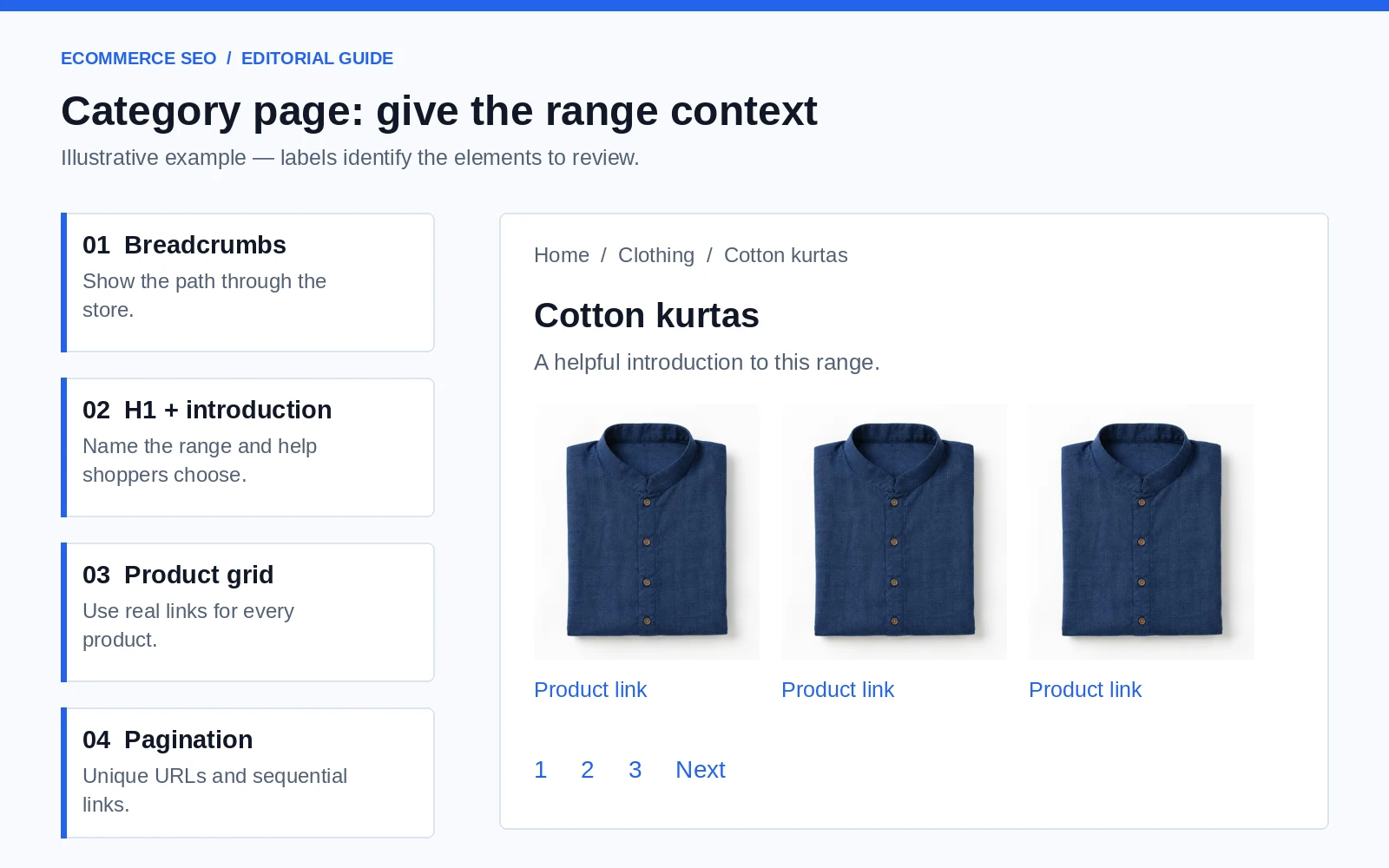
Category pages usually target the broadest commercial searches in a store, yet many are left as a grid of products with a one-word heading. Category page SEO is about giving those pages enough context to rank while keeping the products easy to browse.
Titles, H1s and introductory copy
- Write a unique title tag that names the category the way shoppers search for it, plus a short qualifier such as the brand name.
- Use one H1 that matches the category name.
- Add a short introduction (two to four sentences) above the grid that explains what the range covers and helps people choose. Longer buying advice can sit below the products so it does not push them out of view.
- Avoid repeating the same template sentence across every category with only the name swapped. That copy helps no one.
Link to every product in a way Google can follow
Google's ecommerce guidance says category pages should link to the products in that category, and notes that products reachable only through a site search box may not be found, because Googlebot generally does not submit searches (Google Search Central: ecommerce site structure). The same page recommends standard <a href> links rather than JavaScript click events for navigation.
In practice:
- Make sure product tiles use real links, not buttons that run a script.
- Test any "load more" button or infinite scroll. Google states that its crawler does not click buttons, so products loaded only on click may not be discovered (Google: pagination and incremental loading).
- Watch for content hidden behind interactions that matter to Indian shoppers, such as a pincode check for delivery. If the delivery promise, return terms or price only appear after a pincode is entered, Google may never see them.
Get pagination right
Large categories need more than one page of results. Google's pagination guidance recommends that you:
- Give each page its own URL, for example
?page=2. - Link the pages in sequence with normal links, and link back to the first page.
- Avoid pointing every paginated page's canonical tag at page one; each page should use its own canonical.
- Avoid
#fragments for page numbers, because Google ignores them.
Source: Pagination, incremental page loading, and their impact on Google Search.
Checklist
- Unique title tag and H1 on every category.
- Helpful intro copy that is specific to the range.
- Every product linked with a crawlable
<a href>link. - Paginated pages have unique URLs, sequential links and self-referencing canonicals.
Product page SEO checklist
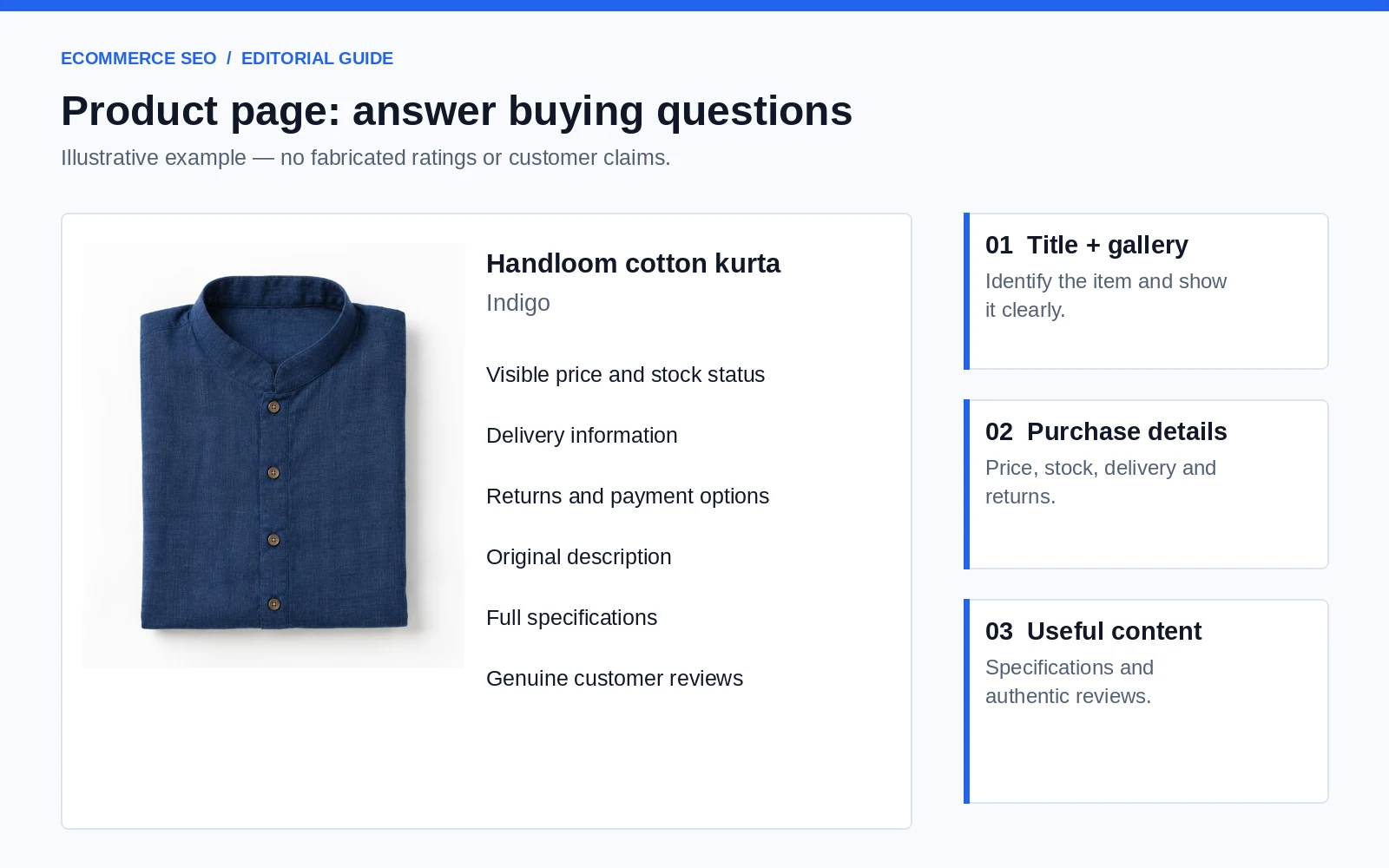
A product page has two jobs: rank for specific searches and give the shopper enough confidence to buy. Good product page SEO serves both at once, because the details a buyer needs are also the details that make the page distinct from every other store selling the same item.
Write titles and descriptions that answer buying questions
- Build product titles from what shoppers type: brand, product type, key attribute (material, size, capacity), and model where relevant.
- Write original descriptions. If you sell branded goods, the manufacturer's text is probably on dozens of other sites. Rewrite it around use, fit, care and who the product suits.
- Put specifications in a structured list or table: dimensions, materials, weight, compatibility, what is in the box.
- Answer the questions your support team hears most often. Those questions are a free source of useful content.
Put price, delivery and returns information on the page
Shoppers compare. If they cannot find the total cost or the delivery time quickly, they leave to check elsewhere.
- Show the price clearly, and state whether taxes and shipping are included.
- Give an estimated delivery time and any regions you cannot serve.
- Summarise the returns or exchange policy on the page, with a link to the full policy.
- List the payment options you accept. If you offer cash on delivery, say so near the price.
- Show stock status honestly, including "only a few left" only when it is true.
Use reviews and questions from real customers
Reviews add original, specific text to a page and answer concerns that product copy cannot. Collect them after delivery, display them on the product page in HTML (not only inside an image or a third-party widget that loads late), and respond to negative reviews constructively. Never write or buy reviews. Fake reviews damage trust with shoppers and are hard to undo.
Checklist
- Product title follows a consistent, searchable pattern.
- Description is original and specific to the product.
- Specifications are complete and readable.
- Price, delivery, returns and payment information are visible without extra clicks.
- Real customer reviews appear in the page HTML.
How to handle duplicate product variants
Variants are versions of one product that differ by an attribute such as size, colour or pack size. They are one of the most common sources of duplicate content in online stores.
One URL or one URL per variant?
Both approaches can work. The choice depends on whether people search for the variants separately.
| Situation | Recommended approach |
|---|---|
| Variants differ only in size and nobody searches by size | One product page with a size selector |
| Colours are searched separately and look different ("red saree", "navy saree") | Separate variant URLs, or a single page whose selected colour changes the URL, with careful canonicals |
| Variants are genuinely different products (different material, capacity or model) | Separate product pages, each with unique content |
Canonical rules for variant URLs
Google's URL guidance for ecommerce sites gives clear rules (Designing a URL structure for ecommerce sites):
- Give each variant a distinct URL using a path segment (
/t-shirt/green) or a query parameter (/t-shirt?color=green), rather than a#fragment, which Google does not use for indexing. - If the variant parameter is optional, the canonical URL should be the version without it.
- If each variant has its own URL and you want one main page indexed, add a canonical tag on each variant page pointing to the main product URL.
Remember that a canonical tag is a strong hint, not a command. Google can choose a different canonical if your other signals disagree, for example if internal links and the sitemap all point at a variant (Google: consolidate duplicate URLs). Keep links, sitemaps and canonicals consistent.
Checklist
- A written rule exists for when variants get their own URL.
- No variant URL relies on a
#fragment. - Canonicals, internal links and sitemaps all point to the same preferred URL.
Faceted navigation: decide what Google should crawl
Faceted navigation is the set of filters on a category page: size, colour, price, brand, rating and so on. Each combination can create a new URL, so a category with a handful of filters can produce thousands of near-identical pages.
Google describes faceted navigation as by far the most common source of overcrawling issues that site owners report to it (Google Search Central Blog, December 2024). The fix starts with a decision: which filter pages, if any, should appear in search?
| Filter type | Example | Usual decision |
|---|---|---|
| Sort orders | ?sort=price_asc | Keep out of search |
| Low-demand combinations | size + colour + price band | Keep out of search |
| Single filters with real search demand | "black kurtas", "Nike running shoes" | Build as an indexable landing page |
| Filters that repeat an existing category | "Women" filter on a women's category | Keep out of search |
When to block filter URLs
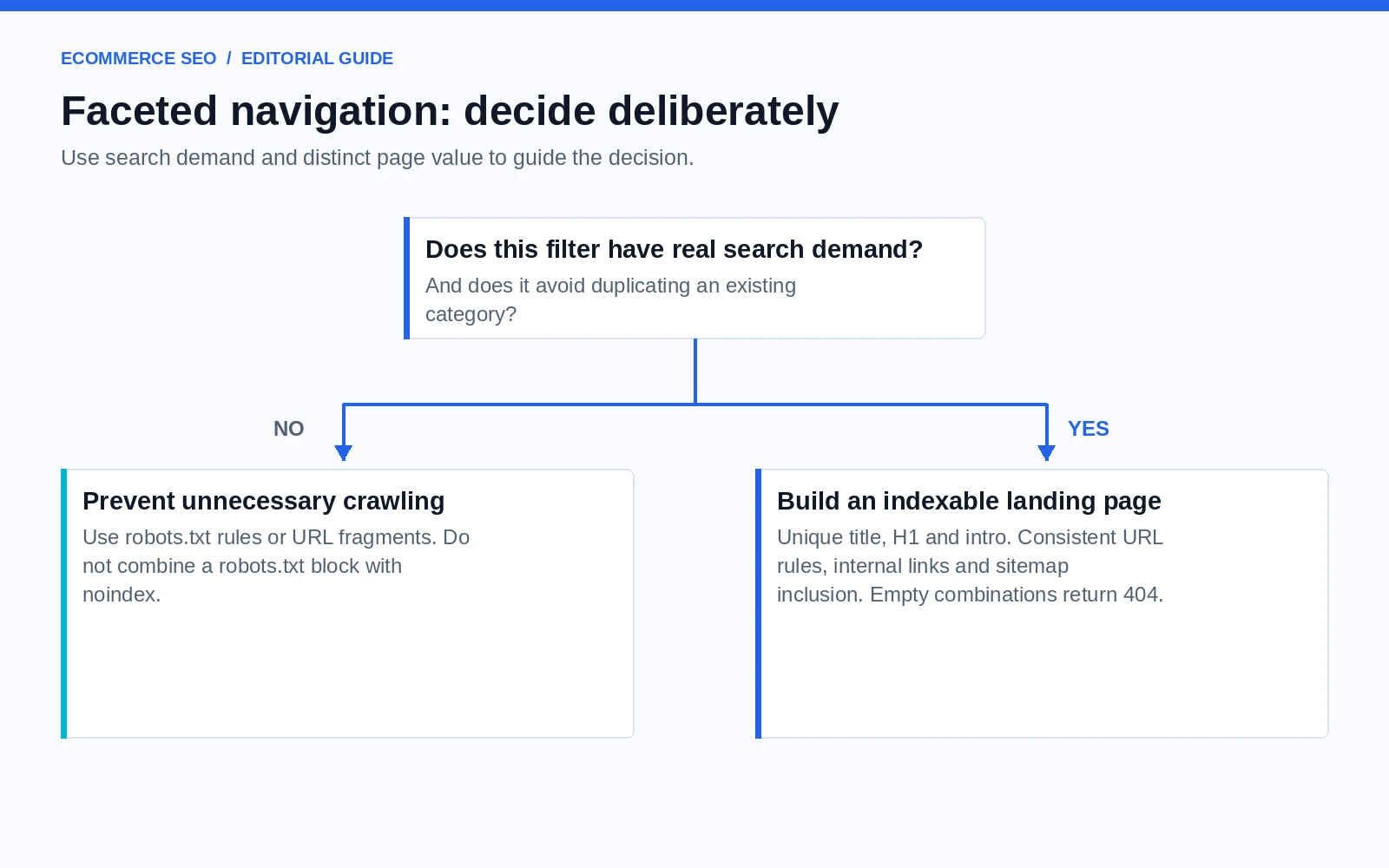
If you do not need filter URLs in Google, Google's faceted navigation documentation recommends preventing crawling, either with robots.txt disallow rules for the filter parameters or by placing filters in URL fragments (Managing crawling of faceted navigation URLs). It describes rel="canonical" and rel="nofollow" as weaker signals that tend to be less effective over the long term.
One mistake appears in several popular checklists: blocking filter URLs in robots.txt and adding noindex to the same URLs. Google cannot see a noindex tag on a page it is not allowed to crawl, so the two instructions work against each other. Choose one approach per URL pattern. Also note that robots.txt controls crawling, not indexing; a blocked URL can still be indexed without its content if other pages link to it.
When a filter page deserves to be indexed
If a filter matches a search people actually make, treat it as a landing page, not a by-product of the filter system. Google's documentation sets out the rules for faceted URLs you want crawled (Managing crawling of faceted navigation URLs):
- Use the standard
&separator between parameters. - Keep filter order consistent (for example, colour always before size) and prevent duplicate filters.
- Return a 404 status when a filter combination has no results, rather than an empty page with a 200 status.
On top of that, give the page its own title, H1 and short introduction, link to it from the parent category and navigation, and include it in your XML sitemap.
Checklist
- Every filter parameter has a decision: block, or build as a landing page.
- No URL pattern is both blocked in robots.txt and marked noindex.
- Indexable filter pages have unique titles, H1s and intro copy.
- Empty filter combinations return a 404.
Internal links between categories, products and guides
Internal links show Google how pages relate and which ones matter most. Google's ecommerce guidance suggests linking best-selling products from the homepage or from content such as blog posts, since more internal links generally signal greater importance (Google: ecommerce site structure).
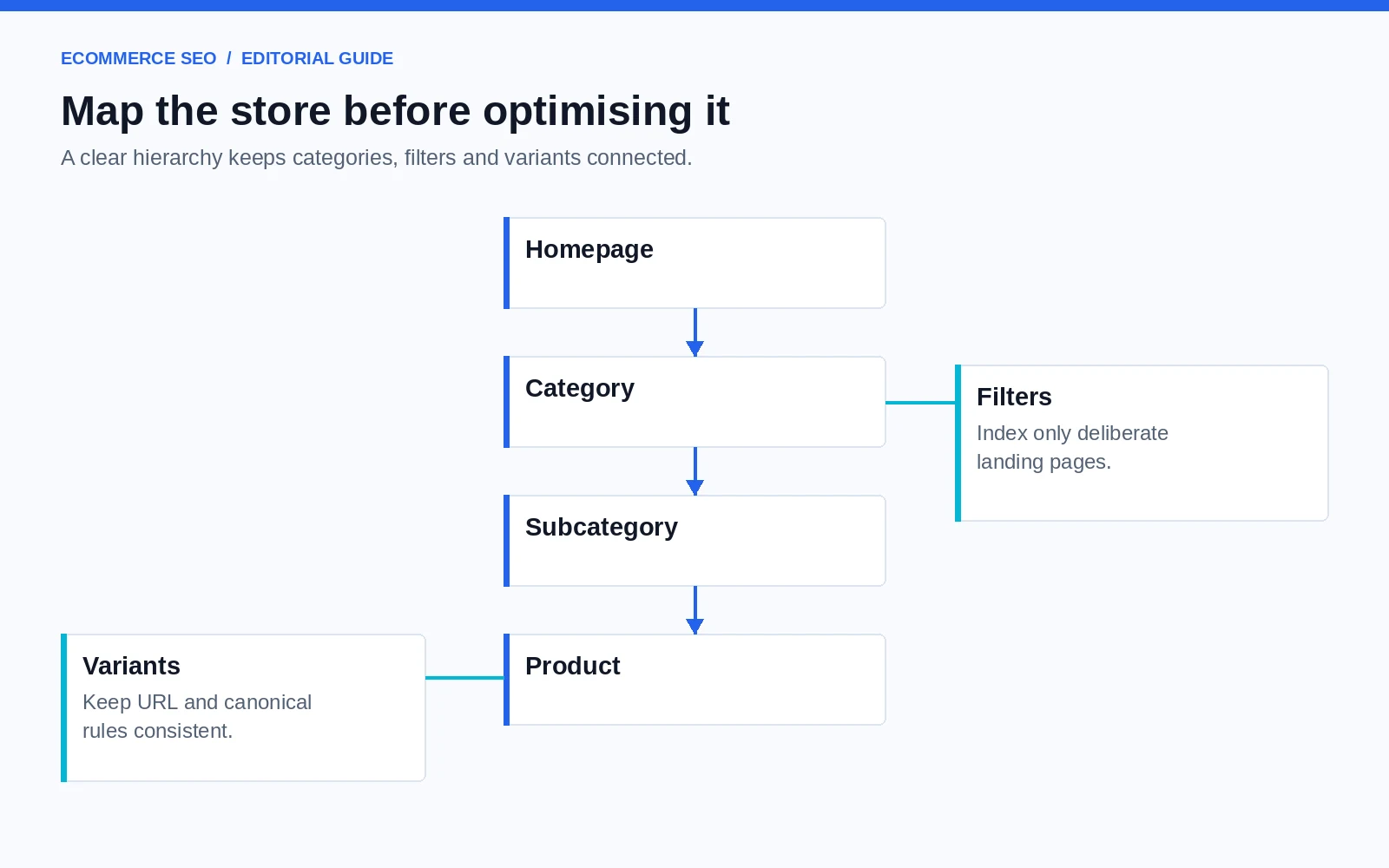
- Keep a clear path: homepage, category, subcategory, product.
- Add breadcrumbs to category and product pages.
- Link related categories to each other (for example, "Kurtas" to "Kurta sets" and "Dupattas").
- Link from buying guides and blog posts to the category that matches the guide's intent.
- Use descriptive anchor text, such as the product or category name, rather than "click here".
- Use the canonical URL in every internal link, never a tracking or session version.
Product schema and structured data
Structured data describes your products in a format search engines can read. Good product schema can make product pages eligible for richer search results, though eligibility is never a guarantee of display.
Product snippets and merchant listings
Google's documentation describes two classes of product results (Introduction to Product structured data):
- Product snippets can show details such as ratings, reviews, price and availability. Pages that review products, as well as pages that sell them, can use this markup.
- Merchant listing experiences rely on more specific data such as price, availability, shipping and returns. Only pages where a shopper can buy the product are eligible (Merchant listing structured data).
Since 2022, a Google Merchant Center account has not been required to become eligible for merchant listing experiences; product data supplied through structured data on your pages can be enough (Google Search Central Blog, September 2022).
A simplified example for a single product page might look like this:
{
  "@context": "https://schema.org",
  "@type": "Product",
  "name": "Handloom Cotton Kurta, Indigo",
  "image": "https://www.example.com/images/handloom-cotton-kurta-indigo.jpg",
  "description": "Straight-cut handloom cotton kurta in indigo with a mandarin collar.",
  "sku": "KUR-IND-001",
  "brand": { "@type": "Brand", "name": "Example Brand" },
  "offers": {
    "@type": "Offer",
    "url": "https://www.example.com/kurtas/handloom-cotton-kurta-indigo",
    "price": "1499.00",
    "priceCurrency": "INR",
    "availability": "https://schema.org/InStock",
    "itemCondition": "https://schema.org/NewCondition"
  }
}
Treat this as a starting point. Merchant listings support further properties, such as shipping details and return policy, so check Google's current required and recommended properties before you build the template.
Mark up variants with ProductGroup
For products with variants, Google supports the schema.org ProductGroup type with three properties: hasVariant to nest the variants, variesBy to list the attributes that differ, and productGroupID for the parent SKU (Product variant structured data). Shared details, such as brand and reviews, sit on the group, while price, size, colour and availability sit on each variant.
Validate and keep data consistent
- Test templates with the Rich Results Test before release.
- Monitor the Product snippets and Merchant listings reports in Search Console after release.
- Make sure the price, stock status and currency in your markup match the visible page and any Merchant Center feed. Mismatches cause errors and confuse shoppers.
- Add
BreadcrumbListmarkup to reflect your category hierarchy, andOrganizationmarkup on the site to describe the business (Google: structured data for ecommerce).
Product image SEO
Product images do a lot of selling, and they can also bring visitors through Google Images and other visual search features.
- Use HTML
<img>elements for product images, not CSS backgrounds. - Name files descriptively:
handloom-cotton-kurta-indigo-front.jpg, notIMG_4821.jpg. - Write alt text that describes the image in context. Google's own example contrasts the weak alt text "puppy" with the better "Dalmatian puppy playing fetch" (Google image SEO best practices). For products, describe the item, colour and view.
- Serve images at the size they display, compress them and use modern formats such as WebP where your platform supports them.
- Show the product from several angles, plus a scale or in-use shot.
Indexation: sitemaps, status codes and out-of-stock pages
Indexation problems are easy to miss on a store because the catalogue changes every week.
- List only canonical, indexable URLs in your XML sitemap. Leave out filter, sort and variant URLs you have chosen not to index.
- Check the Page Indexing report in Search Console regularly for "Crawled, currently not indexed", "Duplicate without user-selected canonical" and soft 404 issues.
- For an empty category, Google suggests a
noindextag; if the category is removed for good, consider returning a 404 (Google URL structure guide).
Out of stock, discontinued or replaced?
Treat temporary and permanent cases differently.
| Situation | What to do |
|---|---|
| Temporarily out of stock | Keep the page live with a 200 status. Keep the full description and specs, show the stock status, set schema availability to OutOfStock, offer a restock alert and suggest alternatives. |
| Discontinued, with a close replacement | 301 redirect to the replacement product or the most relevant category. |
| Discontinued, with no replacement | Return a 404 or 410 status. |
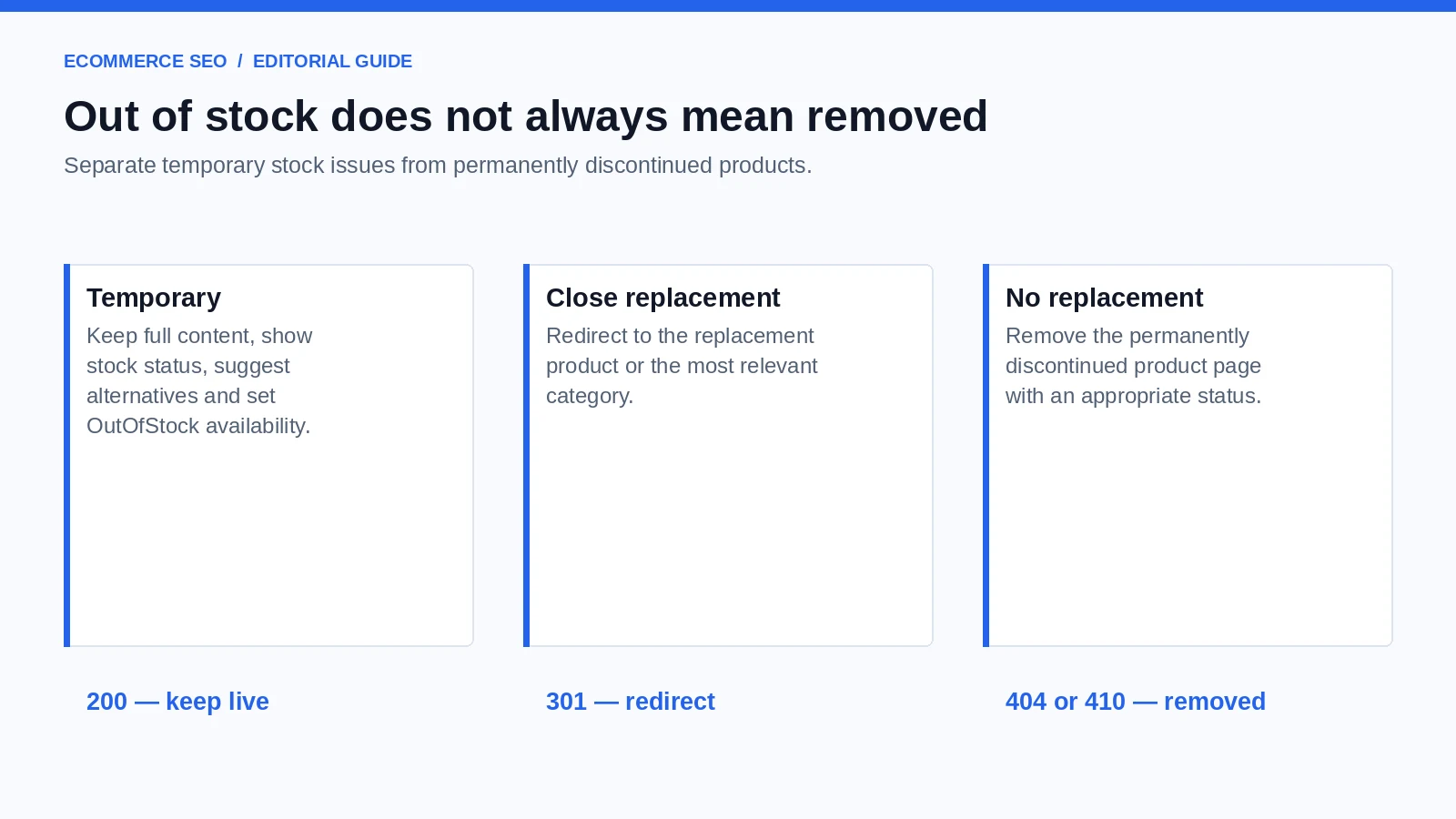
That last row follows Google's advice for soft 404s: if you removed a page and there is no replacement with similar content, return a 404 or 410 (How HTTP status codes affect Google Search). A thin "product unavailable" page with a 200 status is a common source of soft 404 reports.
Page speed and Core Web Vitals on store templates
Core Web Vitals measure real-user loading, responsiveness and visual stability. The "good" thresholds are a Largest Contentful Paint (LCP) of 2.5 seconds or less, an Interaction to Next Paint (INP) of 200 milliseconds or less, and a Cumulative Layout Shift (CLS) of 0.1 or less, measured at the 75th percentile of page loads (web.dev: Core Web Vitals thresholds).
Check category and product templates separately, because they fail for different reasons:
- Category pages: many product images, filter scripts and review badges. Lazy-load images below the first rows and reserve space for tiles to avoid layout shifts.
- Product pages: large image galleries, zoom tools, chat widgets, pincode checkers and third-party apps. Remove apps you no longer use and load non-essential scripts after the main content.
Use the Core Web Vitals report in Search Console for field data, and PageSpeed Insights to debug individual templates.
Measurement: how to tell the checklist is working
Track results by page type, not only for the site as a whole. A healthy blog can hide a declining category template.
In Google Search Console
- Filter the Performance report by URL pattern (for example,
/collections/or/product/) to compare category and product clicks, impressions and positions. - Watch the Page Indexing report for changes in indexed product and category URLs.
- Monitor the Product snippets and Merchant listings reports for structured data errors.
In Google Analytics 4
- Set up the recommended ecommerce events, such as
view_item_list,view_item,add_to_cart,begin_checkoutandpurchase, so organic sessions can be tied to revenue. - Use the landing page report, filtered to organic search, to see which category and product pages start sessions that lead to sales.
Review these numbers monthly, and compare like-for-like periods to allow for seasonal sales such as festive periods.
Where to start if you have hundreds of products
A long checklist can stall a small team. Work in this order:
- Template fixes first. A wrong canonical, a missing H1 or broken product schema on the product template affects every product at once. One fix can correct thousands of URLs.
- Crawl control next. Decide your faceted navigation and variant rules, then clean up the sitemap.
- Revenue categories. Improve titles, intros and internal links for the categories that bring the most sales or have the most search demand.
- Top products. Rewrite descriptions and add specs and FAQs for best sellers and high-margin items.
- The long tail. Work through remaining products in batches, starting with those that already get impressions in Search Console.
Frequently asked questions
A useful ecommerce SEO checklist covers keyword mapping, category page SEO, product page SEO, variant handling, faceted navigation, internal links, product schema, image optimisation, indexation and measurement. General items such as HTTPS and mobile design matter too, but they are not specific to online stores.
Usually category pages. They tend to target broader commercial searches with more demand, and improving one category template helps every category. Product pages matter most for model-specific searches and for best sellers.
Not always. If people search for a variant separately, such as a specific colour, a distinct URL can help. If they do not, one product page with a selector is simpler. Whichever you choose, keep canonicals, internal links and sitemaps consistent.
Pick one per URL pattern. If you do not need filter pages in search, Google recommends preventing crawling through robots.txt or URL fragments. Do not combine a robots.txt block with noindex on the same URLs, because Google cannot read a noindex tag on a page it cannot crawl. Filters with real search demand can be built as indexable landing pages instead.
If the product is coming back, keep the page live, show its stock status, set product schema availability to OutOfStock and suggest alternatives. If it is discontinued, redirect to a close replacement or return a 404 or 410 if there is none.
No. Google has allowed pages to become eligible for merchant listing experiences through structured data alone since 2022. Merchant Center is still useful for free listings and for keeping product data in sync, and it is required for Shopping ads.
Check the Search Console indexing and structured data reports monthly, and run the full ecommerce SEO checklist whenever you change theme, platform, URL structure or filter setup, and at least once or twice a year.
Get a second pair of eyes on your store
Most stores do not need every item on this list fixed at once. They need to know which template issues are holding the most pages back, and in what order to fix them.
If you would like an outside view, our e-commerce SEO team can review your category and product templates, filter setup and structured data, and give you a prioritised list of fixes. Where crawl or indexation problems run deeper than the store templates, a technical SEO review is the better place to start.
Get an e-commerce SEO review and see where your product and category pages stand.