

You can publish useful content, build backlinks and optimise service pages, but those efforts may struggle if search engines cannot properly access, render or understand your website. Technical SEO helps identify the issues that can prevent important pages from being discovered and processed.
A technical SEO audit checklist gives you a structured way to review your website before investing more in SEO. It helps you find problems with crawling, indexing, redirects, site structure, page performance, JavaScript rendering and structured data—and decide which fixes deserve attention first.
This guide explains what to check, how to verify common issues and how to turn audit findings into a practical action plan.
What is a technical SEO audit?
A technical SEO audit is a systematic review of the technical elements that affect how search engines discover, crawl, render, interpret and potentially index a website. It also examines technical factors that influence the experience people have when using the site.
The purpose is not to achieve a perfect score in every SEO tool. It is to identify issues that affect important URLs, understand their business impact and prioritise fixes. A warning in a crawler does not automatically mean a ranking problem; every finding needs context.
Why should you run a technical SEO audit before investing in SEO?
If important pages are blocked from crawling, marked noindex by mistake, redirected incorrectly or missing from the site's internal structure, additional content and link-building activity may not address the real problem.
- Find barriers to discovery: identify important pages that search engines cannot reach through crawlable links or sitemap discovery.
- Protect indexability: detect accidental noindex directives, incorrect canonical tags and conflicting URL versions.
- Improve user experience: identify slow, unstable or difficult-to-use page templates.
- Reduce wasted effort: prioritise technical fixes before scaling content or off-page campaigns.
- Create a reliable baseline: record the site's current condition so future changes can be evaluated.
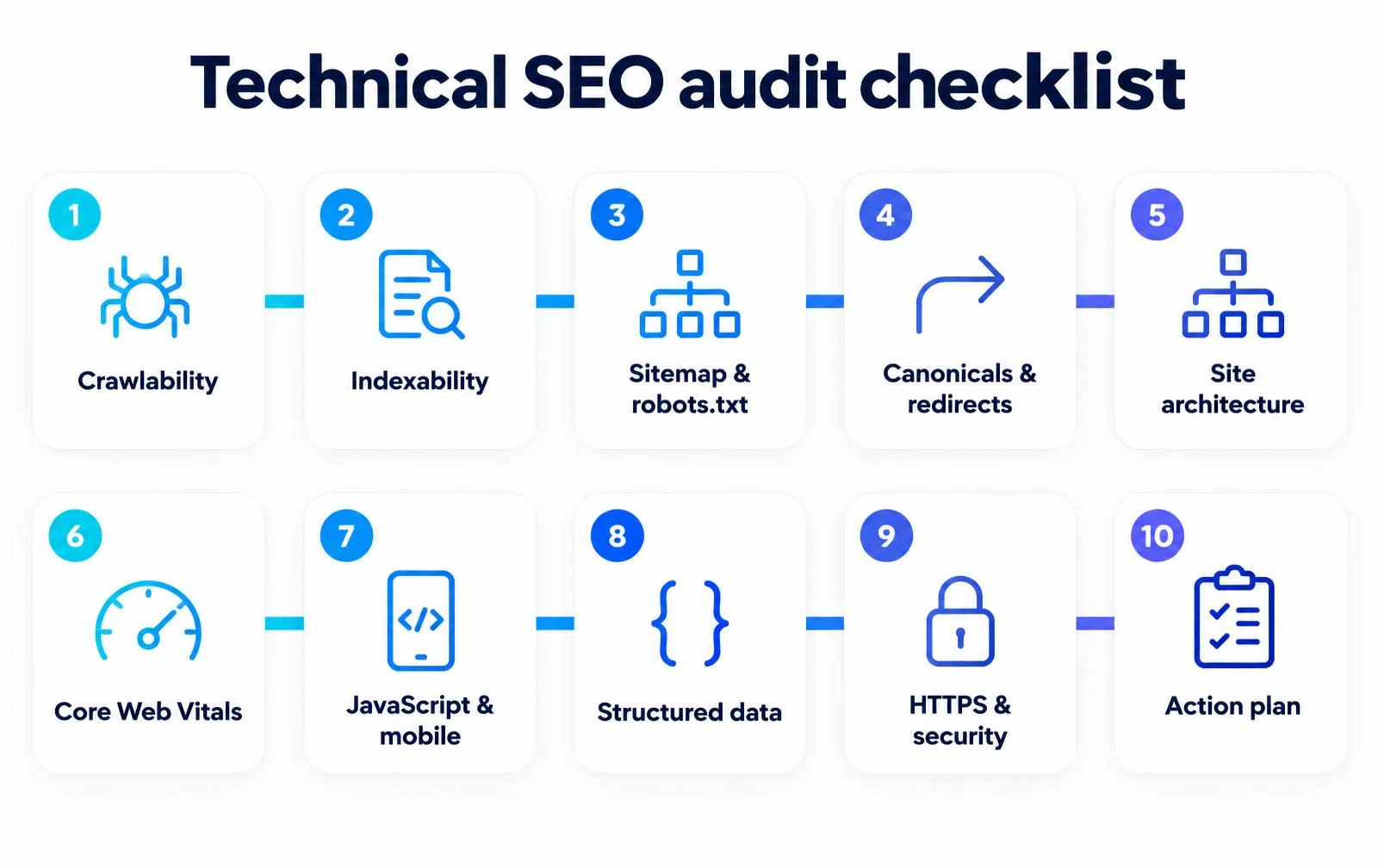
Technical SEO audit checklist: 10 areas to review
1. Check website crawlability
Crawlability is the ability of a search engine crawler to access URLs and the resources needed to process them. Start by checking whether the important sections of the website can be reached.
- Review robots.txt at the root of the domain, usually example.com/robots.txt.
- Check that important service, category, product and blog sections are not accidentally disallowed.
- Check whether essential CSS and JavaScript resources needed to render pages are accessible to Googlebot.
- Review internal links to confirm that important pages can be reached through standard crawlable links.
- For larger websites, inspect crawl patterns and server logs where available to understand how bots access the site.
How to verify: review robots.txt, use Google Search Console's URL Inspection tool, and crawl the website with a crawler such as Screaming Frog SEO Spider or Sitebulb.
Common mistake: treating robots.txt as a way to remove a URL from Google's index. Robots.txt controls crawler access; it is not a reliable deindexing method. If a page must be excluded from search, use an appropriate noindex directive or access restriction, and ensure the crawler can see that directive.
2. Check indexability and index coverage
Crawling and indexing are different. A page can be accessible to a crawler but still not be indexed. Review the pages that matter to the business rather than relying only on the total indexed-page count.
- Check the Page Indexing report in Google Search Console for excluded URLs and reported reasons.
- Inspect priority URLs individually with URL Inspection.
- Look for accidental meta robots noindex tags or X-Robots-Tag HTTP headers.
- Confirm important pages return a successful HTTP status and contain indexable content.
- Review duplicate, alternate and crawled-but-not-indexed patterns; investigate page quality and duplication rather than repeatedly resubmitting URLs.
A 200 status code and the absence of a noindex directive make a page eligible for indexing; they do not guarantee that Google will index it. Google makes indexing decisions based on multiple systems and signals.
3. Review XML sitemap and robots.txt configuration
An XML sitemap helps search engines discover URLs that a site considers important. It should support a clean site architecture, not act as a substitute for internal links.
- Confirm the sitemap loads successfully and uses the correct canonical host and protocol.
- Include URLs that should be indexed, are canonical and return a successful status.
- Remove redirected, blocked, noindex, duplicate or error URLs from the sitemap.
- Check that recently added or updated important pages are represented.
- Submit the sitemap in Google Search Console and monitor processing or fetch errors.
Keep robots.txt and the sitemap consistent. Do not block a URL in robots.txt if search engines need to crawl it to see a noindex directive or other page-level instructions. A sitemap submission helps discovery; it does not guarantee crawling, indexing or rankings.
4. Audit canonical tags, redirects and status codes
Canonical tags and redirects help consolidate URL signals and guide users and crawlers to the intended page. Conflicting instructions can make it harder for search engines to identify the preferred URL.
- Check that important pages use the intended canonical URL, commonly a self-referencing canonical when the page is the preferred version.
- Look for canonical tags pointing to irrelevant pages, redirected URLs or non-equivalent content.
- Check HTTP and HTTPS versions, and www and non-www host variants; choose one preferred version and redirect alternatives consistently.
- Find redirect chains, loops and unnecessary temporary redirects.
- Review 404 and 5xx responses, soft 404 patterns and internal links that point to redirected or broken URLs.
How to verify: crawl the website and export status codes, redirect destinations and canonical targets. Confirm representative URLs in the browser and Search Console.
Do not redirect every removed URL to the homepage. Redirect a retired URL to a genuinely relevant replacement when one exists; otherwise, return an appropriate not-found or gone response.
5. Review site architecture and internal links
A clear site structure helps people navigate and helps crawlers discover relationships between pages. Important pages should not be buried several clicks deep without a good reason.
- Check that core services and important categories are linked from relevant navigation or hub pages.
- Review click depth and identify valuable pages with few or no internal links.
- Find broken internal links and links that unnecessarily pass through redirects.
- Use descriptive anchor text that explains the destination naturally.
- Review pagination, filters and URL parameters where they create large numbers of low-value or duplicate URLs.
Prioritise architecture fixes around important business pages. A large crawl report may contain hundreds of low-impact warnings; the goal is to fix problems that affect discovery, usability or the correct interpretation of key pages.
6. Measure Core Web Vitals and page performance
Page performance affects user experience. Google's Core Web Vitals measure loading performance, responsiveness and visual stability. Use real-user field data where available and lab tests to diagnose specific issues.
| Metric | What it measures | Good target |
|---|---|---|
| Largest Contentful Paint (LCP) | Loading performance: when the main content is likely to have loaded. | 2.5 seconds or less |
| Interaction to Next Paint (INP) | Responsiveness to user interactions. | 200 milliseconds or less |
| Cumulative Layout Shift (CLS) | Visual stability while the page loads and changes. | 0.1 or less |
These thresholds are assessed at the 75th percentile of page visits, segmented across mobile and desktop experiences. A URL may not have enough field data for an individual assessment; PageSpeed Insights may show origin-level data or no field data in that situation.
- Use PageSpeed Insights to review field data and lab diagnostics where available.
- Check the Core Web Vitals report in Search Console for groups of URLs with similar issues.
- Review oversized images, render-blocking resources, unnecessary scripts and slow server responses.
- Check layout shifts caused by images without dimensions, late-loading elements, ads or font changes.
- Investigate long main-thread tasks and heavy JavaScript that delay interaction.
Do not treat a 100/100 Lighthouse score as the business objective. Prioritise improvements that make important pages faster and more stable for real users.
7. Check JavaScript rendering and mobile experience
Some websites rely heavily on JavaScript to display navigation, page text, product information or internal links. If important content appears only after client-side scripts run, confirm that search engines can render and interpret it correctly.
- Compare the initial HTML with the rendered page for key templates.
- Check that primary content, titles, meta robots directives and canonical signals are not missing or changed unexpectedly after rendering.
- Confirm important links are present as crawlable links rather than inaccessible click-only interactions.
- Inspect key templates on mobile devices and test menus, forms, buttons, tables and content layout.
- Check that mobile pages contain the same important content and structured data as the intended desktop experience.
Use URL Inspection's live test and rendered-page view for representative URLs. For complex JavaScript sites, involve a developer when rendering, hydration or routing problems are suspected.
8. Validate structured data and schema markup
Structured data provides explicit information about page content and entities. Correct schema can make a page eligible for certain search appearances, but it does not guarantee a rich result or improve rankings automatically.
- Choose schema types that accurately describe the visible page content, such as Organization, BreadcrumbList, Article or an appropriate Product or Service-related representation where supported.
- Use valid properties and follow the requirements for the specific structured data feature.
- Make sure marked-up information is visible on the page and is not misleading or fabricated.
- Check that schema is not duplicated or contradictory across plugins, themes and custom code.
- Test eligible markup with Google's Rich Results Test and validate Schema.org syntax where appropriate.
Do not add review ratings, prices, FAQs, business details or other claims that are not genuinely supported by the visible page. Google does not guarantee rich-result display even when structured data is technically valid.
9. Review HTTPS, security and technical hygiene
A technical audit should also identify issues that undermine user trust or make the site unstable.
- Confirm the website uses HTTPS and that important pages do not load insecure mixed content.
- Check that HTTP versions redirect consistently to HTTPS.
- Review broken assets, missing images, server errors and important resource failures.
- Check for accidental exposure of staging sites, development pages, backup files or sensitive directories.
- Review unwanted URL parameters, duplicate archives, tag pages or search-result pages that create low-value crawl paths.
- Check that redirects and canonical signals remain correct after redesigns, migrations or CMS changes.
10. Create a prioritised technical SEO action plan
An audit is useful only when findings turn into assigned work. Do not treat every warning as equally urgent. Score issues using business impact, number of affected URLs, severity and implementation effort.
| Priority | Examples | Recommended response |
|---|---|---|
| Critical | Important pages blocked, accidental noindex on revenue pages, site-wide canonical error, widespread 5xx errors. | Investigate immediately, assign an owner and verify the fix on affected templates and URLs. |
| High | Important pages excluded from sitemap, broken internal links to priority pages, redirect chains, serious rendering problems. | Schedule in the next development or SEO sprint and validate after deployment. |
| Medium | Weak internal linking, duplicate URL patterns, template-level metadata or schema errors with limited reach. | Plan fixes by template and affected URL volume. |
| Low / monitor | Minor warnings with no clear impact, low-value URLs or tool-specific recommendations that do not apply to the site. | Document, monitor and avoid spending disproportionate effort. |
A useful audit record should include: affected URL or template, issue description, evidence or screenshot, number of affected pages, business impact, priority, recommended fix, owner, status and date verified.
Which tools can help with a technical SEO audit?
| Tool | Best use |
|---|---|
| Google Search Console | Indexing reports, URL Inspection, sitemap processing, Core Web Vitals and search performance. |
| Screaming Frog SEO Spider | Crawling URLs, status codes, redirects, canonicals, directives, headings, internal links and sitemap comparisons. |
| Sitebulb | Visual site auditing, crawl analysis, architecture and issue prioritisation. |
| PageSpeed Insights | Core Web Vitals field data where available and Lighthouse lab diagnostics. |
| Rich Results Test | Testing eligibility and technical validity for supported Google rich-result features. |
| Chrome DevTools | Inspecting network requests, rendering, console errors and performance behaviour. |
| Server logs (where available) | Understanding actual crawler requests and response codes. |
You do not need every tool for every website. Start with Search Console, a reliable crawler and PageSpeed Insights. Add log analysis or specialist debugging when the site's size or technical complexity justifies it.
How often should you perform a technical SEO audit?
Run a baseline audit before starting a major SEO campaign, and repeat focused checks after website redesigns, migrations, major template changes or CMS updates. For an actively maintained website, review Search Console and important technical indicators regularly, with a broader audit at a cadence that matches site size, release frequency and risk.
A small brochure website may need a lighter review than a large e-commerce website with filters, product variants and frequent releases. The correct frequency depends on how often the site changes and how costly technical errors would be.
Frequently asked questions
It should cover crawlability, indexability, robots.txt, XML sitemaps, status codes, redirects, canonical tags, site architecture, internal links, Core Web Vitals, mobile experience, JavaScript rendering, structured data, HTTPS and technical hygiene.
Yes. Google Search Console, PageSpeed Insights, the Rich Results Test and browser developer tools provide useful free checks. A crawler's free version may also be enough for a small website, while larger sites may need paid crawling or log-analysis tools.
No. A sitemap helps search engines discover URLs and understand which pages a site considers important. It does not guarantee that a URL will be crawled, indexed or ranked.
Crawlability is whether a search engine can access and fetch a URL. Indexability is whether the page is eligible to be included in the search index. A page can be crawlable but excluded by a noindex directive, or it can be inaccessible because of crawler restrictions.
No. Robots.txt primarily controls crawler access. A blocked URL may still be known to Google through links, even if Google cannot crawl its content. Use noindex or access controls when the goal is to keep a page out of search, and make sure crawlers can access the directive.
Core Web Vitals are part of Google's page experience considerations and measure real-world user experience. They are worth improving, but good scores do not guarantee higher rankings. Relevance, content quality and many other systems also affect search visibility.
It depends on the number of URLs, templates, technologies and issues. A small website can often receive an initial review quickly, while large or JavaScript-heavy sites may require deeper crawling, log analysis, developer testing and staged validation. The time required to implement fixes is separate from the audit itself.
Conclusion: Fix the technical barriers before scaling SEO
A technical SEO audit helps establish whether your website is accessible, understandable and usable before you invest further in content or link building. Start with crawlability and indexability, then review URL signals, site architecture, rendering, Core Web Vitals, structured data and security.
Most importantly, turn the findings into a prioritised action plan. Fix issues that affect valuable pages first, verify the changes and monitor the site after implementation. A clear audit gives your SEO investment a stronger technical foundation—but it is not a guarantee of rankings or leads.